
NetSuite 2026.1 Didn’t Fix Your Reporting
Address sub-record filtering in 2026.1 improves visibility — but your summary totals can still be wrong. Here’s why most teams misunderstand the change.
NetSuite 2026.1 Didn’t Fix Your Reporting
NetSuite 2026.1 added automatic filtering for address sub-records. It fixes cross-entity visibility — but it does not fix the issue that silently breaks your summary totals.
If you think this update cleaned up your reporting, you’re probably wrong.
The setup
Earlier this year, we saw 1099 reporting totals inflated by the number of addresses on a vendor record.
When 2026.1 dropped, the release notes said:
Queries and APIs that read address information will show only the addresses related to the primary record you're viewing.
At a glance, that sounds like the fix.
It isn’t.
What 2026.1 actually fixes
Before 2026.1, address-related queries could surface addresses outside the expected parent record.
2026.1 tightens that:
- Customer records only show that customer’s addresses
- Vendor records only show that vendor’s addresses
- Employee records only show that employee’s addresses
This is a real improvement:
- Fixes cross-entity data bleed
- Improves data privacy
- Makes APIs and sublists behave more predictably
That problem is now handled correctly.
What it does not fix
The issue that breaks reporting was never about visibility.
It’s about cardinality.
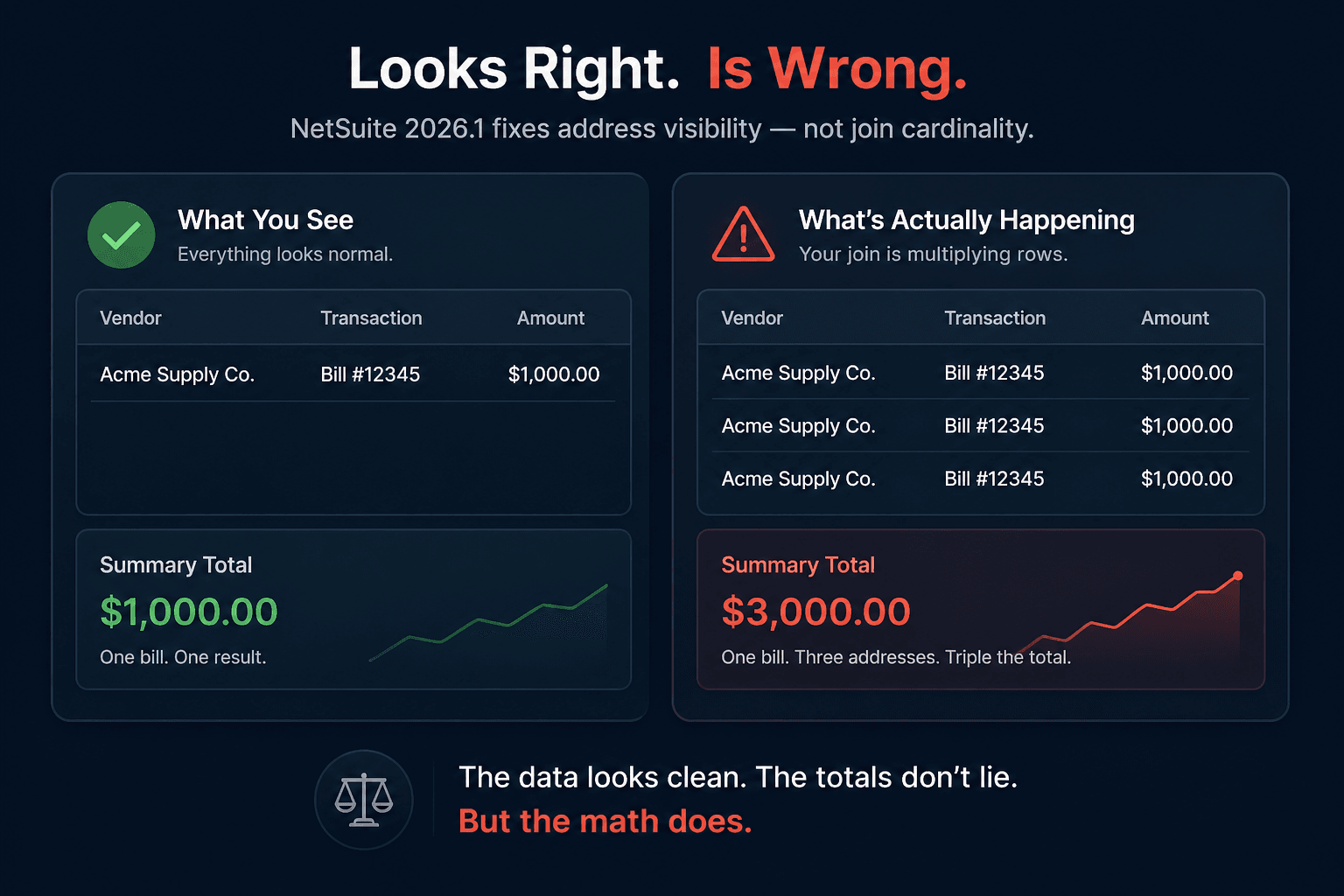
A vendor can have multiple addresses. When you join to the addressbook and aggregate, NetSuite produces one row per address.
That doesn’t change in 2026.1.
Example:
One $1,000 bill
Three addresses on the vendor
Summary total = $3,000
NetSuite didn’t miscalculate anything. Your join exploded the dataset.
2026.1 filters which addresses appear. It does not change how many rows the join produces.
If your saved search, SuiteQL query, or workbook joins to addressbook and sums transaction data:
👉 Your totals are still wrong.
Why this actually matters
This isn’t theoretical.
This hits:
- 1099 reporting
- AP summaries
- Vendor spend analysis
- Any aggregated reporting touching entity addresses
And the worst part:
It looks correct at a glance.
Totals inflate quietly. No errors. No warnings. Just bad numbers.
You won’t catch it unless you:
- Reconcile against detail
- Understand how the join behaves
- Or already know this problem exists
Most teams don’t.
The fix is still the fix
Nothing about 2026.1 changes the resolution:
- Source address fields from the transaction, not the entity
- Avoid aggregating across one-to-many joins
- Validate summary totals against detail before trusting them
If you upgraded and assumed this was handled for you:
Go re-check your reporting.
What actually happens in the real world
Teams read release notes like this and think:
“Good, that’s fixed.”
So they stop questioning the output.
That’s how bad reporting survives upgrades.
NetSuite didn’t fix your totals.
It just made the underlying issue harder to notice.
Takeaway
Release notes describe platform changes.
They do not validate your reporting logic.
If your design was wrong before the upgrade, it’s still wrong after the upgrade — just quieter.
The teams that get burned aren’t the ones who ignore updates.
They’re the ones who assume the update fixed something they never validated in the first place.
Bottom line
NetSuite didn’t break your report.
Your join design did.
And 2026.1 didn’t fix that.
Written by Adaptive Solutions Group — consultants who fix reporting that “looked fine” until it didn’t.
Dealing with this in your own NetSuite account?
We fix exactly these problems in production. Run a free read-only health scan, or talk to a senior NetSuite consultant who has seen it before.

Written by Mike Pagani, founder of Adaptive Solutions Group — a NetSuite consultancy based in Pittsburgh, PA. Mike has been building SuiteScript automations, integrations, and NetSuite rescue projects since 2013.